
Consequential Robotics
Making Computer Vision Accessible Through Visual Robotics Programming
Extending MiRoCode with Blockly-based OpenCV tools so students could build vision pipelines in the browser and control simulated or physical MiRo robots.
- Client
- Consequential Robotics
- Sector
- Educational robotics
- Platform
- MiRoCode / MiRo-E
- Services
- Robotics Software Engineering · Computer Vision · Education
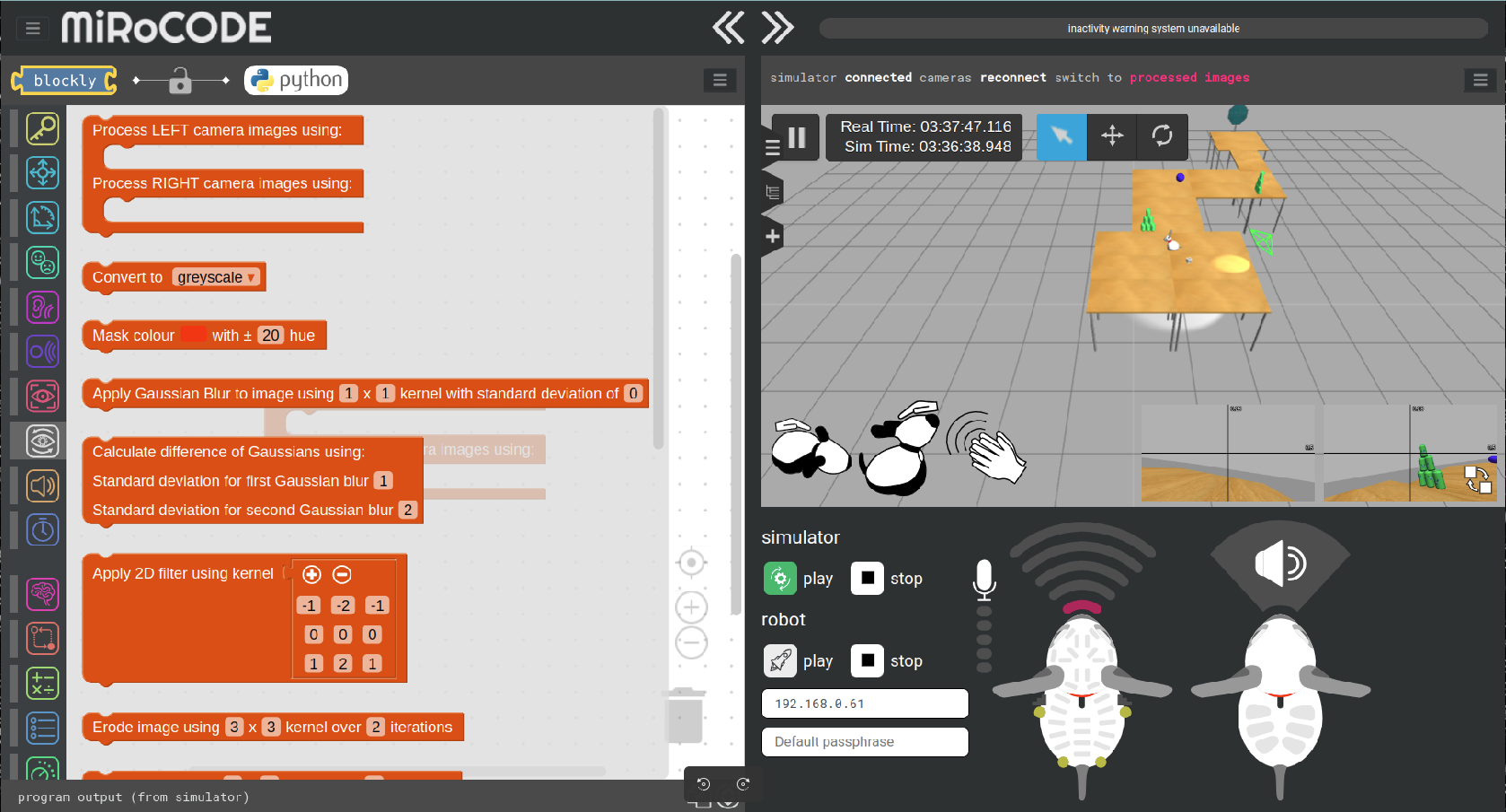
Consequential Robotics developed MiRoCode as a browser-based educational platform for teaching robotics and ROS using the MiRo-E robot.
Code & Motion was brought in to extend the platform with new computer vision capabilities for computer science students at the University of Sheffield.
The aim was to allow students to build OpenCV processing pipelines through a Blockly interface, view the results directly in the browser and use those results to control either a simulated or physical MiRo robot.
The Challenge
A useful computer vision workflow often combines several stages, such as image capture, colour conversion, filtering, thresholding and feature detection.
For students, implementing this from scratch can require knowledge of OpenCV, Python, ROS, networking, simulation and robot control before they can begin experimenting with the underlying concepts.
The challenge was to make these processes more accessible without reducing them to isolated demonstrations. Students needed to be able to connect multiple operations, inspect intermediate outputs and use the final result as part of a wider robot behaviour.
The same workflow also needed to operate with:
- A simulated MiRo running in Gazebo in the cloud
- A physical MiRo-E connected over the local network
Extending the Platform
Although the student-facing result was a new set of visual programming blocks, the implementation required coordinated changes across three layers of the platform.
Blockly Interface and Code Generation
New blocks were created to represent individual OpenCV operations.
Each block required suitable inputs, outputs and parameters, along with code-generation logic that translated the visual program into executable Python.
The blocks were designed to connect together, allowing the output of one image-processing stage to become the input of another.
Educational Python API
The MiRoCode Python API wrapped the robot’s ROS interface and exposed it in a form suitable for teaching.
This API was extended so that generated Blockly programs could acquire images, apply computer vision operations and access the results without requiring students to work directly with lower-level ROS messages.
ROS Integration
The final layer connected the simplified API to the underlying ROS system.
This supported live camera data and robot control across both the cloud-hosted simulation and physical MiRo-E hardware, while preserving a common programming interface for students.
Browser-Based Vision Workflows
Processed images could be displayed directly within MiRoCloud, allowing students to see how each stage affected the camera feed.
This made operations such as filtering, thresholding and feature detection easier to understand and debug.
The processed output could also be passed into further blocks, including shape and object detectors, before being used to influence robot behaviour.
For example, a detected feature could trigger movement, select an action or form part of a larger decision-making sequence.
Simulation and Real Hardware
The same Blockly programs could operate on images from either a simulated or physical robot.
Students could begin developing and testing their workflows in a cloud-hosted Gazebo environment, then apply the same programming model to a MiRo-E on the local network.
This provided a practical route from simulation-based learning to experimentation with real robotics hardware.
The Outcome
The completed work expanded MiRoCode across its browser interface, code-generation system, Python API and ROS integration.
Students were able to:
- Build multi-stage OpenCV pipelines visually
- Process live images from simulated or physical robots
- View intermediate and final results in the browser
- Pass processed images into shape and object detectors
- Use perception results to control robot behaviour
The project made advanced computer vision and robotics concepts easier to explore while preserving the important relationship between sensing, processing, decision-making and control.
What appeared to the student as a set of intuitive visual blocks was supported by a deeper integration across the full MiRoCode software stack.
Building Educational Robotics Tools?
Let's discuss how we can help make advanced robotics capabilities accessible to your users.